Base 64 Encoding

Can we transfer files(Binary data) in a JSON string?
The answer to this question is both yes and no. How could the answer be both yes and no even though we are not talking about quantum mechanics.
JSON won’t natively support binary data as value or key. The value can either be number, string, json object, json array. So in this perspective we cannot transfer files in a JSON string. But JSON supports string data, So if we can convert the file(binary data) into a string then we can store that file in key or value and transfer the file in JSON format.
But, How to convert(encode) binary data into a string? The answer to this question is quite simple - BASE 64 Encoding. Using base 64 we can encode any binary data into string. But before getting into how base 64 works we can have a look on why base 64 encoding was introduced in the first place.
Birth of Base 64 Encoding :
In the early days of software development most protocols relied on ASCII(7 bit encoding). Consider SMTP - The standard mail protocol. As this protocol was heavily dependent on ASCII mail had the following limitations.
Attachment(file) transfer in mail was not possible
Emoji or Languages other than english was not supported
Why they are not supported? Languages other than English are mostly unicode supported, Unicode is a 8-bit encoding format(when it was introduced). Also files are represented in 8-bit chunks.
As SMTP relied on ASCII 7 bit encoding, Transferring 8-bit chunks will lead to data corruption in the receiving end. So to overcome this limitation, People introduced a hack Base 64 encoding.
HOW BASE 64 WORKS:
Consider this binary data 01110110 01110010 Encoding this data will take the below steps
- Representing in Binary format - I have taken the data in binary.
0111011001110010
- Group the Bits in 6 bit chunks
011101 100111 0010
We are unable to make the last 6 bit chunk as there are only 4 bits remaining (16 % 6 = 4). We need to add padding to it at the LSB.
so our 6bit chunks will be 011101 100111 001000
- Get Decimal value for chunks:
Our 6 bit binary chunks are 011101 100111 001000
Convert each chunk to their decimal equivalent .
011101 - 29
100111 - 39
001000 - 8
- For each decimal value replace with the base64 charset equivalent:
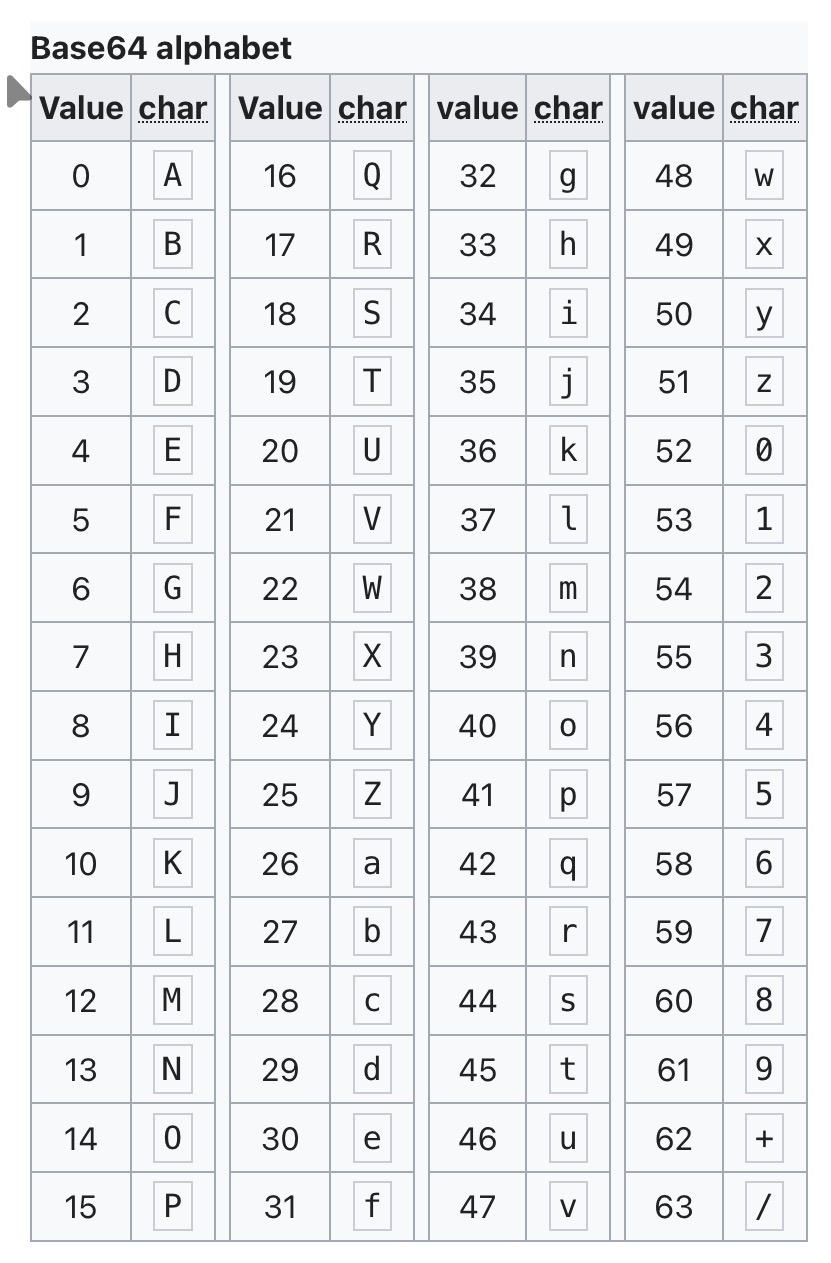 Image taken from wikipedia.
From the above image convert the decimal data to its equivalent base64 character
29 - d
39 - n
8 - I
So our Base64 encoded string is dnI. If you have noticed clearly so far you would already have a doubt regarding the decoding process. The extra 2 bits we have added, Won't those impact the decoding process. To avoid this a special character is added to represent the extra bits that we have added. That extra character is = (single = means 2 padding 0 bits are added == means 4 padding 0 bits are added).
Note : Base64 is used to encode bytes so the number of padding bits needed will be 0 or 2 or 4.
So the final Base64 encoded string will be dnI=. We can clearly see the encoded string has ascii supported charset. So the smtp protocol used in 1990’s will able to handle the byte data in ASCII charset itself.
Decoding is the reverse process of this. The final result will be Bytes.
Conclusion:
So yes we can transfer files in JSON string itself. But we wont use this always, As encoding in base 64 will increase the memory by 33%. Also it is computationally expensive for large files as entire file has to be loaded in memory and it has to be encoded/decoded.